In my journey to better understand the programming language Rust, I decided to re-implement the classic Minesweeper game.
I'll be using SDL2 including its image feature to draw sections of a single PNG image, which contains the numbers, tiles, and other HUD elements
Links
Game features
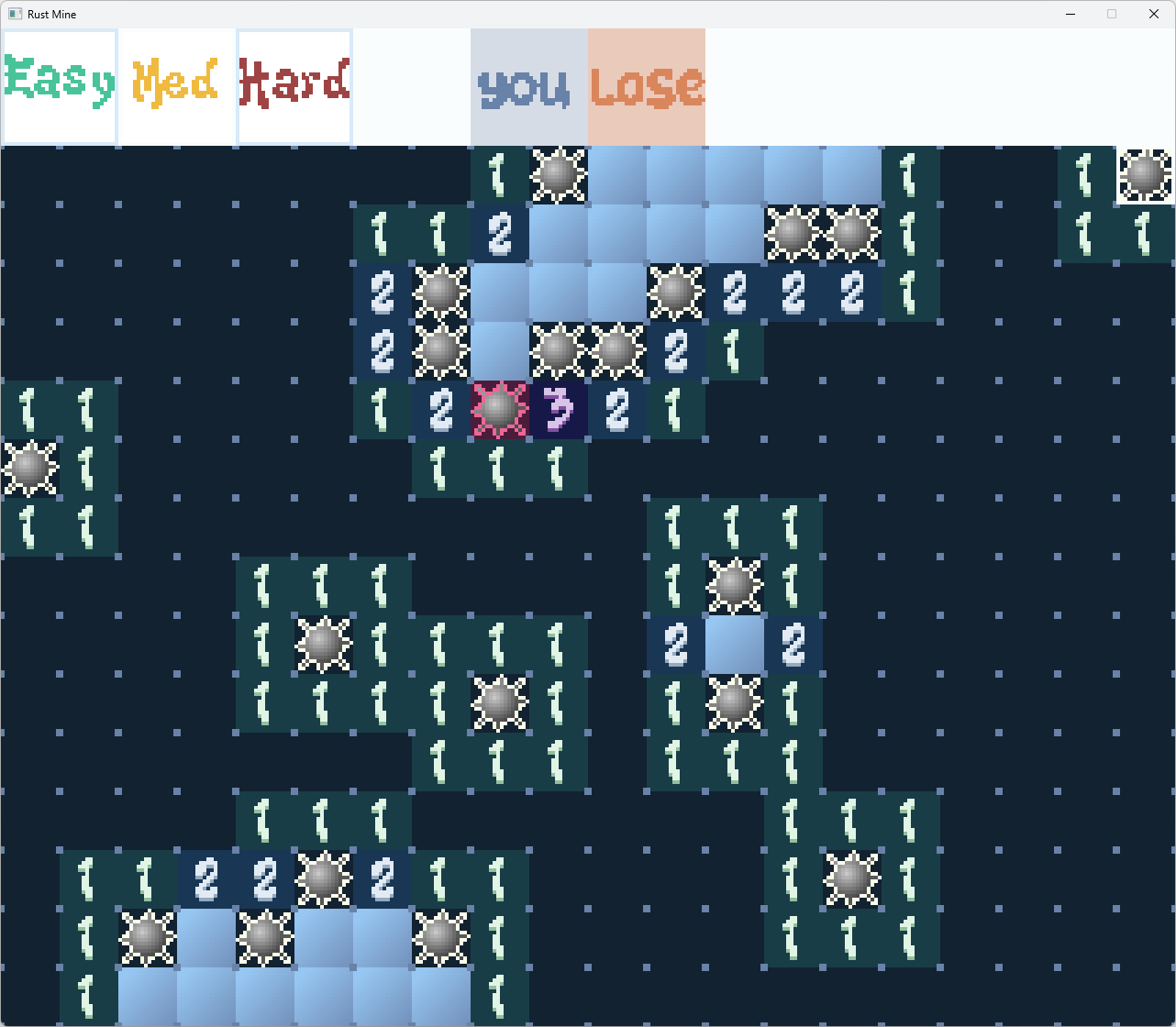
You pick a difficulty first, defaulting to easy, which defines the number of hidden mines, and the size of the board.
Then you can choose one of two things
- Flag a tile (that has not already been revealed) as a suspected mine, so you don't accidentally reveal it, or
- Reveal a tile
- If it's a mine, you lose
- If it's near a mine, it shows the number of neighbouring mines (1-8)
- If there are no neighbouring mines, it reveals itself and its neighbours (since we know none are mines). This will cascade if some of its neighbours also have no neighbouring mines
If you reveal everything except the mines, you win!
The Game State
I like to make an object that represents the entire game state. The update functions can mutate the object, and the render functions can use the same object to draw the whole scene.
Here's the basic object, with the enum Phase and the impl of Game excluded
pub struct Game {
    pub width: usize,
    pub height: usize,
    pub mine_count: u16,
    pub hover_x: u8,
    pub hover_y: u8,
    pub hover_button: u8,
    pub selected_button: u8,
    pub board: Vec<Tile>,
    pub needs_update: bool,
    pub scale: f32,
    pub phase: Phase,
}
The "Cool" Part
The Tile type was interesting to me. Originally I was using an unsigned byte (u8) and some bit masks to store:
- the count of neighbouring mines (or 9 if its a mine) in the first 6 bits
- a bit for whether it has been flagged
- a bit for whether it has been revealed
I started by having the bit masking copy-pasted everywhere, and then it moved into some functions, but then I learnt that you can make a struct that is really just a u8 in memory
#[repr(transparent)]
#[derive(Copy, Clone)]
pub struct Tile(u8);
And then I added some functions to get/set the neighbour count and the bit flags.
impl Tile {
    const SIX_BIT_MASK: u8 = 0b0011_1111; // The bits holding the value
    const FLAGGED_BIT: u8 = 0b0100_0000; // the bit indicating if it is flagged
    const REVEALED_BIT: u8 = 0b1000_0000; // the bit indicating if its revealed

    pub fn new(val: u8) -> Self {
        Self(val)
    }

    pub fn get_value(&self) -> u8 {
        self.0 & Self::SIX_BIT_MASK
    }

    pub fn set_value(&mut self, value: u8) {
        self.0 = (self.0 & !Self::SIX_BIT_MASK) | (value & Self::SIX_BIT_MASK);
    }

    pub fn get_flagged(&self) -> bool {
        (self.0 & Self::FLAGGED_BIT) != 0
    }
    // ... and more
}
Drawing
The drawing logic basically takes this image
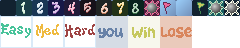
and draws segments of this (defined as a Rect) on sections of the canvas (also using Rect) like
    let tile_src = Rect::new(tx, 0, TILE_PX, TILE_PX);
    let tile_dst = Rect::new(
        (x * TILE_PX as usize) as i32,
        HEADER_HEIGHT as i32 + (y * TILE_PX as usize) as i32,
        TILE_PX,
        TILE_PX,
    );
The above code is used to draw the tile defined by tx (e.g. 5 for the digit 5) and draw it at x, y.
It's worth noting also that there's a scaling algorithm that scales the canvas up in whole numbers so that it fits most of the screen. Since the higher difficulties have more rows and columns, this can mean it resizes when you update difficulty
Building the project
I wanted to be able to build and run this project on Windows and on my Chromebook. This time using SDL2 (as opposed to my Rust Life project) which was more stable, and just required the following for the Chromebook
apt install libsdl2-dev libsdl2-image-dev
and for Windows I had to grab the lib and dll from
| Library | Version | Link | Filename |
|---|---|---|---|
| SDL2 | 2.30.11 | https://github.com/libsdl-org/SDL/releases/tag/release-2.30.11 | SDL2-devel-2.30.11-VC.zip |
| SDL2_image | 2.8.8 | https://github.com/libsdl-org/SDL_image/releases/tag/release-2.8.8 | SDL2_image-devel-2.8.8-VC.zip |
Feedback
I suggest you give it a try, and if you've got the time, I'd accept feedback via GitHub issues.
I decided not to generate any of the code using AI, and simply using it the same way I would use a Google search, to learn the options and when to choose one over the other. I'm sure it could probably one-shot making Minsweeper, but where's the fun in that?